BeepBeep
Delivery Management System
Introduction
- Item Name : Delivery Documentation
- Item Version : v 1.0
- Author : Nizek
- Support Forum : https://beepbeep.live
Getting Started
This documentation describes the workflows/business rules for building the integration with the services used on the Public API. The components described in this documentation include the Public API endpoints, webhooks and configuration used to build and operate the integration.
Use the menu on the left to navigate to the section of interest to you.
Main API's URL
- Test Url: https://apigateway.test.beepbeep.live
- Live Url: https://apigateway.beepbeep.live
Delivery Creation Flow
Integration flow for the process of creating a new delivery and state transitions until fulfilled.
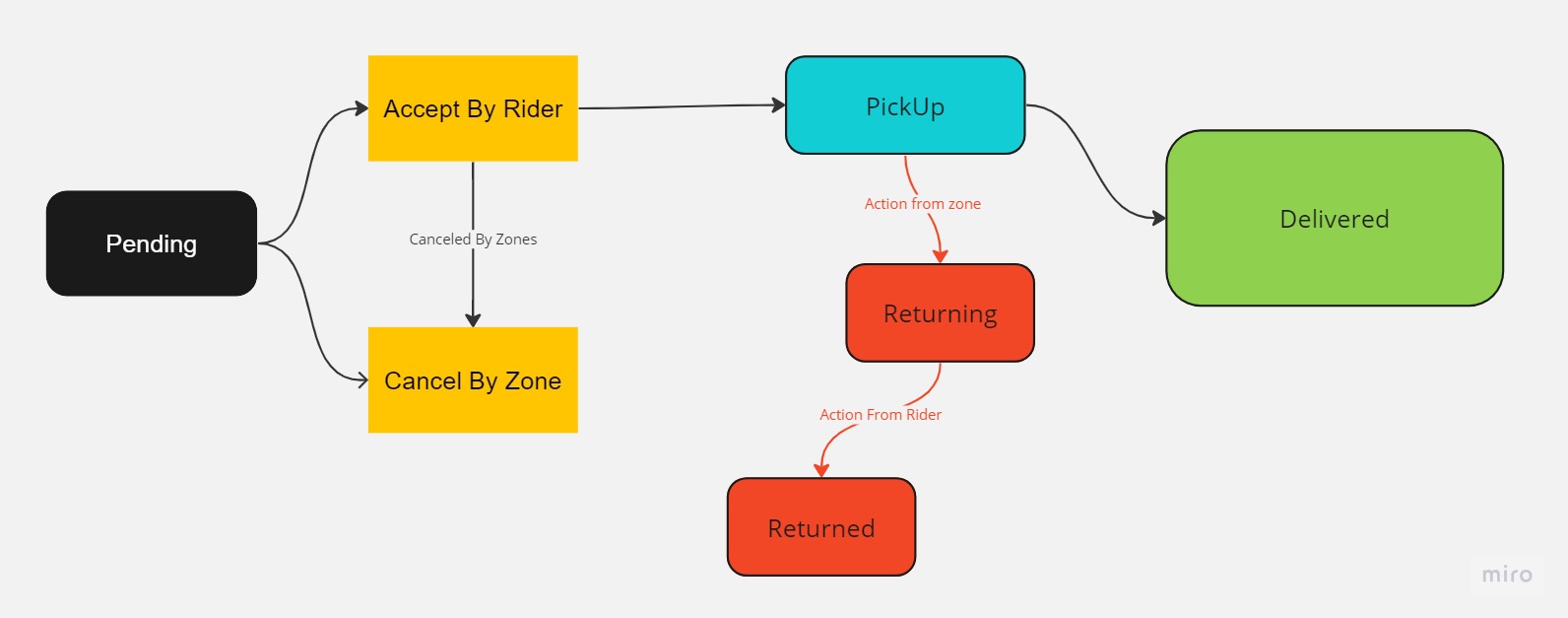
API Authentication
To ensure secure authentication, Tap APIs use HTTP Token Authentication. You must provide your API key as the bearer in the Authorization header in the format "Authorization: Bearer YOUR_SECRET_KEY".
Please note that API requests made without proper authentication will fail.
Create Order
After you get token you can call the curl bellow for create order
|
1
2
3
4
5
6
7
8
9
10
11
12
13
14
15
16
17
18
19
20
21
22
|
curl -X 'POST' \ 'https://api.dev.beepbeep.live/third-party-api/v1/orders/check-out' \ -H 'accept: text/plain' \ -H 'Authorization: YOUR TOKEN' \ -H 'Content-Type: application/json' \ -d '{ "code": "Test01", "cost": 9999, "paymentType": "Cash", "originLocation": { "latitude": 0, "longitude": 0 }, "destinationLocation": { "latitude": 0, "longitude": 0 }, "originAddress": "string", "destinationAddress": "string", "phoneNumber": "string", "description": "string"}' |
The response of API is requestId. You should keep this id to trace the order.
Get Order Status
After you checkout order you want to get status of order. For that call the curl bellow
|
1
2
3
|
curl -X 'GET' \ 'https://paging.dev.beepbeep.live/third-party-api/orders/get-by-id/1f1332b8-6c84-4fc2-ba21-8c05497c92d1' \ -H 'accept: text/plain' |